Showing posts with label TIPS & TRICKS. Show all posts

Add a Anti Ad blocker to blogger and Increase Earning

Ads are annoying??

Yes, sometime it it. But it's the only way to earn  from a site like blog. So, nowadays everyone use ad blocker so that they won't have to face ads on a site. It's not help the author to earn some money. So, the author won't get any revenue. So, what's the way to turn it back.


Yes, it's the anti ad blocker system. If someone use a ad blocker and try to visit your site, it will stop him and say, "Hey disable your ad blocker or wont be able to see it".

So, in this post I'm gonna show you how to add a anti ad blocker on your blog.

1. Go to blogger.

2. Go to your blog.

3.Go to Layout section.

4. Add a Gadget to any section of your blog.

5. Select a HTML/JavaScript section.


6. Paste the code given below.


<style>#g207{position:fixed!important;position:absolute;top:0;top:expression
((t=document.documentElement.scrollTop?document.documentElement.scrollTop:document
.body.scrollTop)+"px");
left:0;width:100%;height:100%;background-color:#fff;opacity:0.9;filter:alpha(opacity=90);display:block}#g207 p{opacity:1;filter:none;font:bold 16px Verdana,Arial,sans-serif;text-align:center;margin:20% 0}#g207 p a,#g207 p i{font-size:12px}#g207 ~ *{display:none}</style><noscript><i id=g207><p>Please enable JavaScript!<br />Bitte aktiviere JavaScript!<br />S'il vous pla&icirc;t activer JavaScript!<br />Por favor,activa el JavaScript!<br /><a href="http://antiblock.org/">antiblock.org</a></p></i></noscript><script>(function(w,u){var d=w.document,z=typeof u;function g207(){function c(c,i){var e=d.createElement('i'),b=d.body,s=b.style,l=b.childNodes.length;if(typeof i!=z){e.setAttribute('id',i);s.margin=s.padding=0;s.height='100%';l=Math.floor(Math.random()*l)+1}e.innerHTML=c;b.insertBefore(e,b.childNodes[l-1])}function g(i,t){return !t?d.getElementById(i):d.getElementsByTagName(t)};function f(v){if(!g('g207')){c('<p>Please disable your ad blocker!<br/>This site is supported by the advertisement <br/> Please disable your ad blocker to support us!!! </p>','g207')}};(function(){var a=['Adrectangle','PageLeaderAd','ad-column','advertising2','divAdBox','mochila-column-right-ad-300x250-1','searchAdSenseBox','ad','ads','adsense'],l=a.length,i,s='',e;for(i=0;i<l;i++){if(!g(a[i])){s+='<a id="'+a[i]+'"></a>'}}c(s);l=a.length;for(i=0;i<l;i++){e=g(a[i]);if(e.offsetParent==null||(w.getComputedStyle?d.defaultView.getComputedStyle(e,null).getPropertyValue('display'):e.currentStyle.display
)=='none'){return f('#'+a[i])}}}());(function(){var t=g(0,'img'),a=['/adaffiliate_','/adops/ad','/adsales/ad','/adsby.','/adtest.','/ajax/ads/ad','/controller/ads/ad','/pageads/ad','/weather/ads/ad','-728x90-'],i;if(typeof t[0]!=z&&typeof t[0].src!=z){i=new Image();i.onload=function(){this.onload=z;this.onerror=function(){f(this.src)};this.src=t[0].src+'#'+a.join('')};i.src=t[0].src}}());(function(){var o={'http://pagead2.googlesyndication.com/pagead/show_ads.js':'google_ad_client','http://js.adscale.de/getads.js':'adscale_slot_id','http://get.mirando.de/mirando.js':'adPlaceId'},S=g(0,'script'),l=S.length-1,n,r,i,v,s;d.write=null;for(i=l;i>=0;--i){s=S[i];if(typeof o[s.src]!=z){n=d.createElement('script');n.type='text/javascript';n.src=s.src;v=o[s.src];w[v]=u;r=S[0];n.onload=n.onreadystatechange=function(){if(typeof w[v]==z&&(!this.readyState||this.readyState==="loaded"||this.readyState==="complete")){n.onload=n.onreadystatechange=null;r.parentNode.removeChild(n);w[v]=null}};r.parentNode.insertBefore(n,r);setTimeout(function(){if(w[v]!==null){f(n.src)}},2000);break}}}())}if(d.addEventListener){w.addEventListener('load',g207,false)}else{w.attachEvent('onload',g207)}})(window);</script>

7. Save it.

So, it's done. Now check is it work or not.

Thanks for reading. Check out our more Tutorials.

Some Wonderful shortcut to use Facebook (PC only)

Daily we upload a lot of photo & status to Facebook. It's very hard to not watching the timeline before going to bed at night. But with the use of Facebook every day, many of us do not know the many details of this social media.


How many options are in settings??
Many of them are unknown to most of us.
Suppose someone would like to comment to a picture, but we don't have to open the comment box to do this.

On the keyboard press c and the comment box will be opened. You can share a post by pressing s. There are several short cuts. Find out those short cuts:

j, k - Scroll between
News Feed stories

p - Post a new status

L - Like or unlike the selected story
c - Comment on
the selected story
s - Share the selected story
o - Open attachment of selected story

So that can be done with a letter. Also the shortcuts used in any software,
There are some such methods. So that you will reach the one at the Friendlist. He will not need to click FRIENDS to find out the options. Take a look at them:

Alt + Shift + 0 - Help
Alt + Shift + 1 - Home

Alt + Shift + 2 - Timeline

Alt + Shift + 3 - Friends
Alt + Shift + 4 - Inbox

Alt + Shift + 5 - Notifications

Alt + Shift + 6 - Settings
Alt + Shift + 7 - Activity Log

Alt + Shift + 8 -About

Alt + Shift + 9 -Terms

Alt + Shift + m -New Message

Check them. If you like it, do not forget to tell friends.

How to Download Movies, Games, Software, Songs for Free with Torrent

Hello, Everyone...

Welcome back again to Blog-tech.


Now, in this post I'm gonna show you how to download anything for free.


WARNING: This is Illegal, So Download with own risk. 
RECOMMENDATION: Use a VPN while downloading.

Search for free VPN

First, Download and Install Utorrent.

Then visit these sites for downloading

Movies


Games, Software, Movies, TV Shows


There are a lot of site for downloading. Just search on Google.

After going to any site you will get magnet link to download. Just click on these link. you will be automatically gone to utorrent. Select directory and hit Ok to download. 

Thanks Everyone.

How to Hide any File on your PC without any Software

Everyone have private files. So we have to Hide/Lock those file for keeping those private. But how to hide them easily?? It's a common question. There are many ways to keep them safe. Sometimes we have to use many kind of software. Or, sometimes we lock them by hard way. But, if we need them immediately, we have to go through this hard way. But now I will tell you the easiest way. It isn't require any software.


First off all create your folder and keep your files in the folder.

Then Select it.

Then Click on View like as Picture.


 Then Click on Hide selected items like as this picture.

After clicking that you won't see the folder. Don't worry. We have just Hidden the folder not deleted.


Now the Question is How to bring the folder back, It means how to unhide it. 

It's easy also. 


Just Click on View Tick on Hidden items. Come back. Now you will see the hidden folder.

 Select it and again click on View and then again click on Hide selected items such as picture.


That's it. If you like this post, Please share it. And if you got any problem let me know this. So put it on comment box.

Earn Money With your Blog with RevenueHits (No need to Approve)/ Best Google Adsense Alternative

Are you a new blogger?
Have your site been visited less than 100 in a day?
Did you fail to approve your site on Google adsense?
Do you worry about to earn with your blog?


If those ans are yes for you, then this tutorial is for you. Now I will show you How to earn with your blog using RevenueHits. So no more talk... just follow my instruction.

1st. You have register with your site & email
Click on Registration down bollow
2nd. Click on Sing Up on right corner of the page
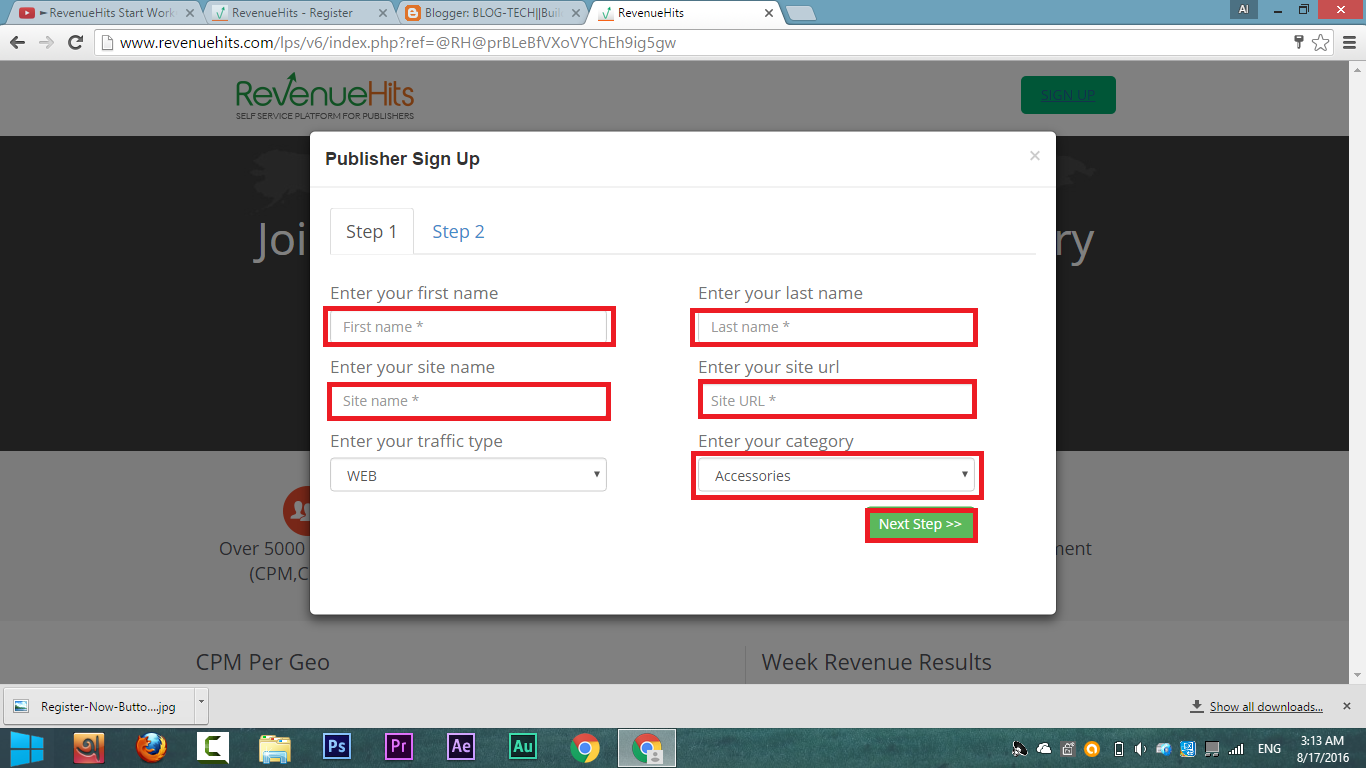
3rd. Give information which needed. I have given them with red box in the picture


4th. After filling all box click on Next Step
5th. Next you will see another box. Fill up it which needed. I have given them with red box in picture


Click on Submit. 
6th. Go to your mail box of given mail & verify it. 
Then click on Log in and Log in with your username and password.


How to Add Youtube Channel Icon/Photo/Watermark on Youtube Video


I think you know what i'm talking about. Yes, I will show you how to add a watermark in your every youtube video.

Note: Your channel must be on Good standing

Just Follow my steps 
1st go to Youtube and click on your channel icon on the right corner. Then click on setting like as this picture.


Then you will see a page. Just click on View additional features  like as this picture


Then you will see like this. Then click on Banding and then click on upload/update to upload your watermark or icon. You can preview your icon on this page such as this picture.


Then go to your channel and check your video. You will see your watermark on your video corner. Thanks for reading.

DOWNLOAD PC GAMES

DOWNLOAD PC APPS