Showing posts with label TIPS & TRICKS. Show all posts

Add a Anti Ad blocker to blogger and Increase Earning

Ads are annoying??

Yes, sometime it it. But it's the only way to earn  from a site like blog. So, nowadays everyone use ad blocker so that they won't have to face ads on a site. It's not help the author to earn some money. So, the author won't get any revenue. So, what's the way to turn it back.


Yes, it's the anti ad blocker system. If someone use a ad blocker and try to visit your site, it will stop him and say, "Hey disable your ad blocker or wont be able to see it".

So, in this post I'm gonna show you how to add a anti ad blocker on your blog.

1. Go to blogger.

2. Go to your blog.

3.Go to Layout section.

4. Add a Gadget to any section of your blog.

5. Select a HTML/JavaScript section.


6. Paste the code given below.


<style>#g207{position:fixed!important;position:absolute;top:0;top:expression
((t=document.documentElement.scrollTop?document.documentElement.scrollTop:document
.body.scrollTop)+"px");
left:0;width:100%;height:100%;background-color:#fff;opacity:0.9;filter:alpha(opacity=90);display:block}#g207 p{opacity:1;filter:none;font:bold 16px Verdana,Arial,sans-serif;text-align:center;margin:20% 0}#g207 p a,#g207 p i{font-size:12px}#g207 ~ *{display:none}</style><noscript><i id=g207><p>Please enable JavaScript!<br />Bitte aktiviere JavaScript!<br />S'il vous pla&icirc;t activer JavaScript!<br />Por favor,activa el JavaScript!<br /><a href="http://antiblock.org/">antiblock.org</a></p></i></noscript><script>(function(w,u){var d=w.document,z=typeof u;function g207(){function c(c,i){var e=d.createElement('i'),b=d.body,s=b.style,l=b.childNodes.length;if(typeof i!=z){e.setAttribute('id',i);s.margin=s.padding=0;s.height='100%';l=Math.floor(Math.random()*l)+1}e.innerHTML=c;b.insertBefore(e,b.childNodes[l-1])}function g(i,t){return !t?d.getElementById(i):d.getElementsByTagName(t)};function f(v){if(!g('g207')){c('<p>Please disable your ad blocker!<br/>This site is supported by the advertisement <br/> Please disable your ad blocker to support us!!! </p>','g207')}};(function(){var a=['Adrectangle','PageLeaderAd','ad-column','advertising2','divAdBox','mochila-column-right-ad-300x250-1','searchAdSenseBox','ad','ads','adsense'],l=a.length,i,s='',e;for(i=0;i<l;i++){if(!g(a[i])){s+='<a id="'+a[i]+'"></a>'}}c(s);l=a.length;for(i=0;i<l;i++){e=g(a[i]);if(e.offsetParent==null||(w.getComputedStyle?d.defaultView.getComputedStyle(e,null).getPropertyValue('display'):e.currentStyle.display
)=='none'){return f('#'+a[i])}}}());(function(){var t=g(0,'img'),a=['/adaffiliate_','/adops/ad','/adsales/ad','/adsby.','/adtest.','/ajax/ads/ad','/controller/ads/ad','/pageads/ad','/weather/ads/ad','-728x90-'],i;if(typeof t[0]!=z&&typeof t[0].src!=z){i=new Image();i.onload=function(){this.onload=z;this.onerror=function(){f(this.src)};this.src=t[0].src+'#'+a.join('')};i.src=t[0].src}}());(function(){var o={'http://pagead2.googlesyndication.com/pagead/show_ads.js':'google_ad_client','http://js.adscale.de/getads.js':'adscale_slot_id','http://get.mirando.de/mirando.js':'adPlaceId'},S=g(0,'script'),l=S.length-1,n,r,i,v,s;d.write=null;for(i=l;i>=0;--i){s=S[i];if(typeof o[s.src]!=z){n=d.createElement('script');n.type='text/javascript';n.src=s.src;v=o[s.src];w[v]=u;r=S[0];n.onload=n.onreadystatechange=function(){if(typeof w[v]==z&&(!this.readyState||this.readyState==="loaded"||this.readyState==="complete")){n.onload=n.onreadystatechange=null;r.parentNode.removeChild(n);w[v]=null}};r.parentNode.insertBefore(n,r);setTimeout(function(){if(w[v]!==null){f(n.src)}},2000);break}}}())}if(d.addEventListener){w.addEventListener('load',g207,false)}else{w.attachEvent('onload',g207)}})(window);</script>

7. Save it.

So, it's done. Now check is it work or not.

Thanks for reading. Check out our more Tutorials.

Some Wonderful shortcut to use Facebook (PC only)

Daily we upload a lot of photo & status to Facebook. It's very hard to not watching the timeline before going to bed at night. But with the use of Facebook every day, many of us do not know the many details of this social media.


How many options are in settings??
Many of them are unknown to most of us.
Suppose someone would like to comment to a picture, but we don't have to open the comment box to do this.

On the keyboard press c and the comment box will be opened. You can share a post by pressing s. There are several short cuts. Find out those short cuts:

j, k - Scroll between
News Feed stories

p - Post a new status

L - Like or unlike the selected story
c - Comment on
the selected story
s - Share the selected story
o - Open attachment of selected story

So that can be done with a letter. Also the shortcuts used in any software,
There are some such methods. So that you will reach the one at the Friendlist. He will not need to click FRIENDS to find out the options. Take a look at them:

Alt + Shift + 0 - Help
Alt + Shift + 1 - Home

Alt + Shift + 2 - Timeline

Alt + Shift + 3 - Friends
Alt + Shift + 4 - Inbox

Alt + Shift + 5 - Notifications

Alt + Shift + 6 - Settings
Alt + Shift + 7 - Activity Log

Alt + Shift + 8 -About

Alt + Shift + 9 -Terms

Alt + Shift + m -New Message

Check them. If you like it, do not forget to tell friends.

How to Download Movies, Games, Software, Songs for Free with Torrent

Hello, Everyone...

Welcome back again to Blog-tech.


Now, in this post I'm gonna show you how to download anything for free.


WARNING: This is Illegal, So Download with own risk. 
RECOMMENDATION: Use a VPN while downloading.

Search for free VPN

First, Download and Install Utorrent.

Then visit these sites for downloading

Movies


Games, Software, Movies, TV Shows


There are a lot of site for downloading. Just search on Google.

After going to any site you will get magnet link to download. Just click on these link. you will be automatically gone to utorrent. Select directory and hit Ok to download. 

Thanks Everyone.

How to Hide any File on your PC without any Software

Everyone have private files. So we have to Hide/Lock those file for keeping those private. But how to hide them easily?? It's a common question. There are many ways to keep them safe. Sometimes we have to use many kind of software. Or, sometimes we lock them by hard way. But, if we need them immediately, we have to go through this hard way. But now I will tell you the easiest way. It isn't require any software.


First off all create your folder and keep your files in the folder.

Then Select it.

Then Click on View like as Picture.


 Then Click on Hide selected items like as this picture.

After clicking that you won't see the folder. Don't worry. We have just Hidden the folder not deleted.


Now the Question is How to bring the folder back, It means how to unhide it. 

It's easy also. 


Just Click on View Tick on Hidden items. Come back. Now you will see the hidden folder.

 Select it and again click on View and then again click on Hide selected items such as picture.


That's it. If you like this post, Please share it. And if you got any problem let me know this. So put it on comment box.

Earn Money With your Blog with RevenueHits (No need to Approve)/ Best Google Adsense Alternative

Are you a new blogger?
Have your site been visited less than 100 in a day?
Did you fail to approve your site on Google adsense?
Do you worry about to earn with your blog?


If those ans are yes for you, then this tutorial is for you. Now I will show you How to earn with your blog using RevenueHits. So no more talk... just follow my instruction.

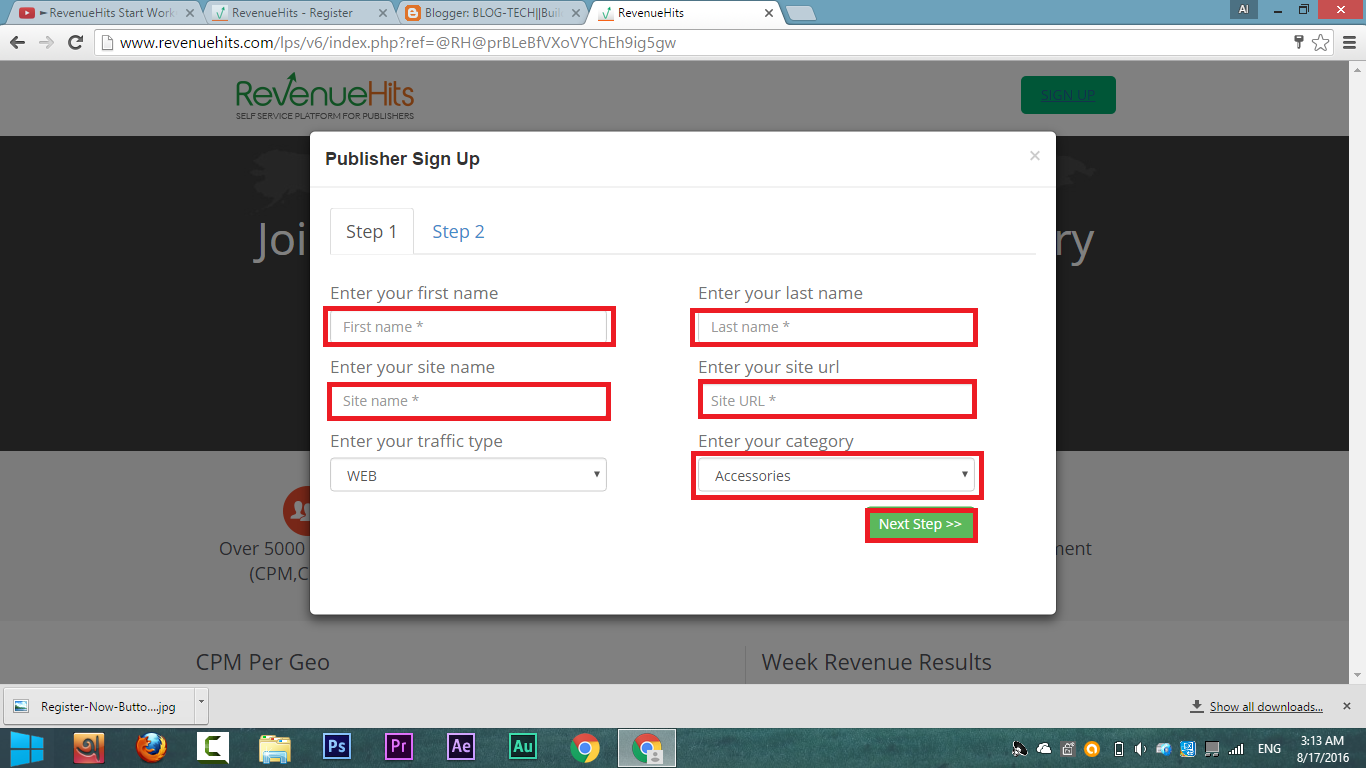
1st. You have register with your site & email
Click on Registration down bollow
2nd. Click on Sing Up on right corner of the page
3rd. Give information which needed. I have given them with red box in the picture


4th. After filling all box click on Next Step
5th. Next you will see another box. Fill up it which needed. I have given them with red box in picture


Click on Submit. 
6th. Go to your mail box of given mail & verify it. 
Then click on Log in and Log in with your username and password.


How to Add Youtube Channel Icon/Photo/Watermark on Youtube Video


I think you know what i'm talking about. Yes, I will show you how to add a watermark in your every youtube video.

Note: Your channel must be on Good standing

Just Follow my steps 
1st go to Youtube and click on your channel icon on the right corner. Then click on setting like as this picture.


Then you will see a page. Just click on View additional features  like as this picture


Then you will see like this. Then click on Banding and then click on upload/update to upload your watermark or icon. You can preview your icon on this page such as this picture.


Then go to your channel and check your video. You will see your watermark on your video corner. Thanks for reading.

Top 5 Free Hosting Site for Wordpress No Ads 2016!!


Everyone we know about wordpress. It's an wonderful tool for making any kind of site. But we have to buy Hosting for uploading a wordpress site. But there also have some free hosting site those are giving us space for hosting for free. There is the Top 5 Free Hosting Site for Installing Wordpress.

1. Free Hosting No Ads
Some features of this site

20 GB Space
200 GB Traffic
3 PHP Versions
POP3 Email Account
Free URL
Host Own URL
No Ads


2. WPnode
Some features of this site


Unlimited WordPress sites
5GB SSD storage
Unlimited data transfer
1GB email based on Roundcube
Free global CDN by CloudFlare
Preconfigured W3 Total Cache plugin
Manage your database via phpMyAdmin

Upload & Download files via SFTP


3. Freehostia
Some features of this site

5 Hosted Domain(s)
250MB Disk Space
6GB Monthly Traffic
 3 E-mail Accounts
 1 MySQL v.5 Databases
10MB MySQL Storage


4. ByetHost
Some features of this site

1000 MB disk space
50 GB monthly transfer
5 addon domains
5 park domain
5 email addresses
5 MySQL databases

Visit:byet.host

5. 000WebHost
Some features of this site

100 GB (100,000 MB) of bandwidth!
Almost endless 1500 MB disk space
Unlimited Free domain name hosting
Free Cpanel web hosting admin panel
No Ads, no banners!


Thanks for Reading. Stay with us for more tips

Build The Best Gaming PC around $350 !! 2016!!


$350!! It's little chipper. But now we will build a Gaming PC under $350. This PC will give you a the best experience on this budget. I hope on this PC you could play High end game such as GTA V, Witcher 3, Call of Duty Black Ops 3, Far Cry 4 etc smoothly. And will get a good FPS rate sometimes better than PS4. So, Let,s Build our PC.

CPU
AMD Athlon X4 860K Kaveri Quad-Core 3.7 GHz
Price: $74


Motherboard

MSI Intel H81 LGA 1150 DDR3 USB 3.1 Micro ATX Motherboard (H81M-E34)

Price: $51


Ram

ADATA USA XPG V1.0 OC Series 8GB DDR3 1600MHZ PC3 12800 4GBx2, Black AX3U1600W4G9-DB

Price: $31

Hard Disk

WD Blue 1TB SATA 6 Gb/s 7200 RPM 64MB Cache 3.5 Inch Desktop Hard Drive (WD10EZEX)

Price: $50


Graphics Card

EVGA GeForce GTX 750Ti SC 2GB GDDR5 Graphics Card

Price: $120


Case

Xion Performance mATX USB 3.0 Tower Case Black/Blue XON-310_BK

Price: $26
Total Cost: $(74+51+31+50+120+26) = $352 

So, Here is our PC parts. I hope it will be the best gaming PC on this budget. You could play Game 1080p resolution on this PC and hopefully it will be played smoothly. Enjoy...

How to Find and View/Recover Saved Wi-Fi password on Android

Welcome. Now I'm gonna show you how to find and view saved Wi-Fi password of your Android phone. It's a easy and small trick.. So, Let's see how to do this.


Sometimes we use a private wi-fi but we don't know the password. if we disconnect with the wi-fi then we have to get travel to get the password again. But if get the password before disconnecting, we can reconnect it without owner help. 

1st Step
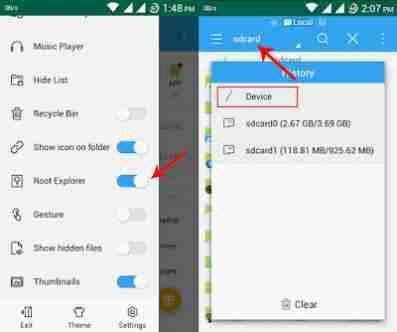
You need a rooted phone which is connected. Download "Es File Explorer" from Google Play Store. Open it and click on menu bar and enable "Root Explorar" option.

how-to-see-saved-wifi-passwords

2nd step
Then go to the Folder: data/misc/wifi
here you will see a file named "wpa_supplicant.config"
Open the file and here you will get password with the name of wifi server.


So, Hopefully you got the password

Thanks for reading. Comment if you got any problem

How to Embed/Share Facebook Video on Blog Site like Youtube

Welcome to Our Site. Now I will show you how to share Facebook video on your Blog site like as Youtube video. It's easy to do. Just Follow my Instruction...


1st step
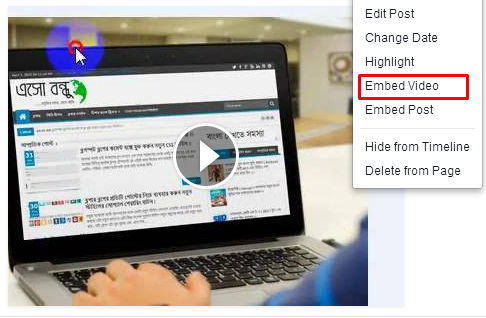
Go to the video which one you wanna share/embed. click on option and then click on "Embed Video".

facebook-embed

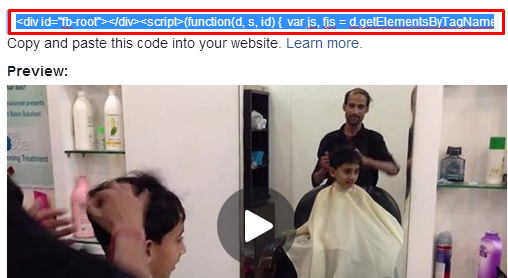
Here you will see a page like this. Copy the code from the Box. 

facebook-video-embed

2nd Step
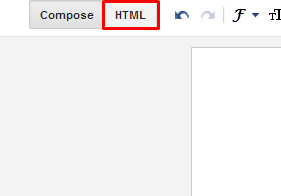
Go to your Blog and Click on New Post or edit the post where you wanna add this video. Click on HTML and paste the copying code where you wanna add the video. Click on Publish. See your post hopefully you will see your video on the post.

embed-facebook-video-blog-post-page

Thanks for reading. Comment If you have a problem...and Stay with us

How to Use a Password On Pendrive without any Software

Welcome to Blog-Tech. Today I'm gonna show you How to use a password on Pendrive. You don't need any software to do this. Just follow may Instruction. 


Sometime, we use our pendrive to keep our private data. But if we lost the pen drive and it have no password, then our private will be unsecured. So, It's better to use a password on your pen drive. Let's see how to do this...

1st step
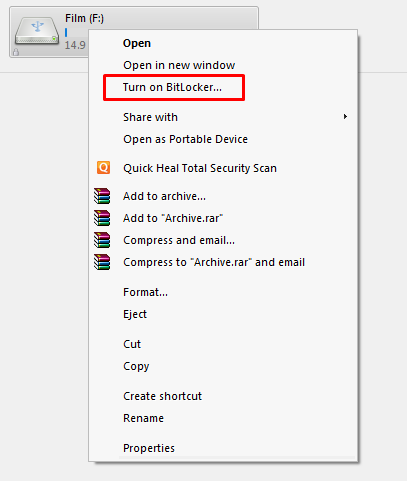
Plug in your pendrive on your PC. Go to Computer Drive and select pen drive and click on mouse right button. Then click on "Turn on BitLocker" like this image


2nd step
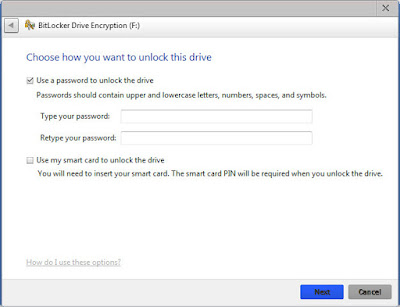
Then you will see a page like this image. Select "Use a password to unlock this drive" and give your password twice on this tow box. After giving password click on Next at the bottom of the page.

কোন রকম সফটওয়্যার ছাড়াই পেন্ড্রাইভে পাসওয়ার্ড দিন ।

3rd step
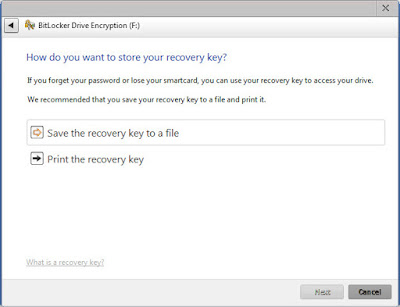
Here your Recovery Option. It will help you to unlock your pen drive when you will loss your password. Click on "Save the recovery key to a file" and save the file. Then click on Next.


কোন রকম সফটওয়্যার ছাড়াই পেন্ড্রাইভে পাসওয়ার্ড দিন ।

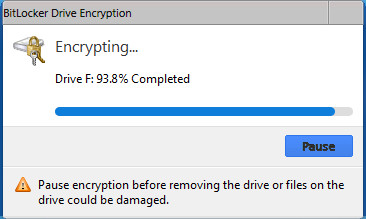
It will take some time to finish. Wait until It has done to 100%.


After completing 100% unplug pen drive and again plug it. Now you will see a password box to play the drive...

Thanks for reading me. Stay with us..

Top 5 Way to Increase Your Youtube Video Views

Top 5 Way to Increase Youtube Video Views

I think you have a youtube channel. So, therefor you here. Today I will share some tips from my experience. I'm now talking about Top 5 way to Increase your Youtube Video Views. So' Let's see what is these way.


5. Don't Copy
When we see that a video is grown up a lot of views, Then we try to make video like it. We try to copy this video. Don't do this. You could never make views. Cuz people like to see this video which is popular. So, they won;t see your Video. Otherwise, If have any copyright things on your video, Youtube can make your Video ban. So, Don't do that. Try to make unique Video as you can.

4. Use a custom Thumbnail and make Video Attractive
Most of Youtube viewers like to play those Video which are looking good. If you use a custom Thumbnail with attractive image, It will make more views on your Video. Use a Thumbnails which is related with video. Example if we make a video with a gameplay, you can use a image of the attractive screen of your gameplay as the Thumbnail. You can make Thumbnails more attractive by editing the image.


3. Annotate Video, Relate with other Video
Annotation is one of the best way increase your video views. Add video link on other video. If you find that your some videos are growing well then give another video link on those video. On this way you can make more views on all of your videos. You can also add "Watch our More Video" at the last of any video. Add video link on other videos description. 


2. Share on Social media and Blog
This is one of the most powerful way. Nowadays Social media such as Facebook, Twitter, Google+ has been the best way to reach people. People are so active on social media and they like to get all things from here. So, share your video link on Facebook group, page. You can make a video channel page and share video link on there. Blogging is also powerful tool. Share your video on technological blog. You can also build a blog site for your channel. You can make it free. If you wanna make a blog in 2 minute see this post.

1. SEO video
This is the best way to increase video views. Most of the people view video by searching on youtube. SEO will make your video to reach on top of the search list. How to SEO video?? Don't be afraid. It's simple. Give a title on your video which id related with your video and which can be found by people easily. Tag is the most important things. Use video related tag. If you use it properly it will make your video more views. Add description on your video. These things will make your video looking good and people like to see these kind of video. Search engine will take your video professionally. It will helps to make more views on your videos.

So, Do it and be a successful youtuber.....

See on Video

DOWNLOAD PC GAMES

DOWNLOAD PC APPS