Showing posts with label BLOGGER. Show all posts

Add a Anti Ad blocker to blogger and Increase Earning

Ads are annoying??

Yes, sometime it it. But it's the only way to earn  from a site like blog. So, nowadays everyone use ad blocker so that they won't have to face ads on a site. It's not help the author to earn some money. So, the author won't get any revenue. So, what's the way to turn it back.


Yes, it's the anti ad blocker system. If someone use a ad blocker and try to visit your site, it will stop him and say, "Hey disable your ad blocker or wont be able to see it".

So, in this post I'm gonna show you how to add a anti ad blocker on your blog.

1. Go to blogger.

2. Go to your blog.

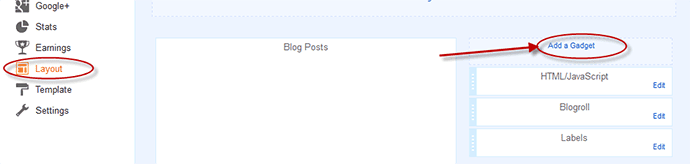
3.Go to Layout section.

4. Add a Gadget to any section of your blog.

5. Select a HTML/JavaScript section.


6. Paste the code given below.


<style>#g207{position:fixed!important;position:absolute;top:0;top:expression
((t=document.documentElement.scrollTop?document.documentElement.scrollTop:document
.body.scrollTop)+"px");
left:0;width:100%;height:100%;background-color:#fff;opacity:0.9;filter:alpha(opacity=90);display:block}#g207 p{opacity:1;filter:none;font:bold 16px Verdana,Arial,sans-serif;text-align:center;margin:20% 0}#g207 p a,#g207 p i{font-size:12px}#g207 ~ *{display:none}</style><noscript><i id=g207><p>Please enable JavaScript!<br />Bitte aktiviere JavaScript!<br />S'il vous pla&icirc;t activer JavaScript!<br />Por favor,activa el JavaScript!<br /><a href="http://antiblock.org/">antiblock.org</a></p></i></noscript><script>(function(w,u){var d=w.document,z=typeof u;function g207(){function c(c,i){var e=d.createElement('i'),b=d.body,s=b.style,l=b.childNodes.length;if(typeof i!=z){e.setAttribute('id',i);s.margin=s.padding=0;s.height='100%';l=Math.floor(Math.random()*l)+1}e.innerHTML=c;b.insertBefore(e,b.childNodes[l-1])}function g(i,t){return !t?d.getElementById(i):d.getElementsByTagName(t)};function f(v){if(!g('g207')){c('<p>Please disable your ad blocker!<br/>This site is supported by the advertisement <br/> Please disable your ad blocker to support us!!! </p>','g207')}};(function(){var a=['Adrectangle','PageLeaderAd','ad-column','advertising2','divAdBox','mochila-column-right-ad-300x250-1','searchAdSenseBox','ad','ads','adsense'],l=a.length,i,s='',e;for(i=0;i<l;i++){if(!g(a[i])){s+='<a id="'+a[i]+'"></a>'}}c(s);l=a.length;for(i=0;i<l;i++){e=g(a[i]);if(e.offsetParent==null||(w.getComputedStyle?d.defaultView.getComputedStyle(e,null).getPropertyValue('display'):e.currentStyle.display
)=='none'){return f('#'+a[i])}}}());(function(){var t=g(0,'img'),a=['/adaffiliate_','/adops/ad','/adsales/ad','/adsby.','/adtest.','/ajax/ads/ad','/controller/ads/ad','/pageads/ad','/weather/ads/ad','-728x90-'],i;if(typeof t[0]!=z&&typeof t[0].src!=z){i=new Image();i.onload=function(){this.onload=z;this.onerror=function(){f(this.src)};this.src=t[0].src+'#'+a.join('')};i.src=t[0].src}}());(function(){var o={'http://pagead2.googlesyndication.com/pagead/show_ads.js':'google_ad_client','http://js.adscale.de/getads.js':'adscale_slot_id','http://get.mirando.de/mirando.js':'adPlaceId'},S=g(0,'script'),l=S.length-1,n,r,i,v,s;d.write=null;for(i=l;i>=0;--i){s=S[i];if(typeof o[s.src]!=z){n=d.createElement('script');n.type='text/javascript';n.src=s.src;v=o[s.src];w[v]=u;r=S[0];n.onload=n.onreadystatechange=function(){if(typeof w[v]==z&&(!this.readyState||this.readyState==="loaded"||this.readyState==="complete")){n.onload=n.onreadystatechange=null;r.parentNode.removeChild(n);w[v]=null}};r.parentNode.insertBefore(n,r);setTimeout(function(){if(w[v]!==null){f(n.src)}},2000);break}}}())}if(d.addEventListener){w.addEventListener('load',g207,false)}else{w.attachEvent('onload',g207)}})(window);</script>

7. Save it.

So, it's done. Now check is it work or not.

Thanks for reading. Check out our more Tutorials.

Post by Custom Categories/Labels Widget for Blogger (Easy)


To add a post by custom labels widget on your blog just follow me....


1st. go to blogger.com and go to your blog.


2nd. Click on Layout and click on Add a Gadget where you wanna add this. You can add it on Sidebar or anywhere you want.


3rd. Then you will see a pop up window. Click on Html/Javascript for this window.


4rt. Here you will see 2 box. On the 1st box type your labels name and on the 2nd box paste the code from down...


 <script type='text/javascript'>var numposts = 5;var showpostthumbnails = true;var displaymore = false;var displayseparator = true;var showcommentnum = false;var showpostdate = false;var showpostsummary = true;var numchars = 100;</script>   
 <script type="text/javascript" src="/feeds/posts/default/-/PC GAMES?published&alt=json-in-script&callback=labelthumbs"></script>  

Note: You must have to replace PC GAMES with your label name from the code.

You can also customize on this code
var numposts ← Number of posts to display
var showpostthumbnails ← Show/hide thumbnails
var displaymore ← Show or hide the read more link
var displayseparator ← Show/hide separator
var showcommentnum ← Show/hide the number of comments
var showpostdate ← Show/hide the posts dates
var showpostsummary ← Show or not the posts summaries
var numchars ← Number of posts characters (here you have to change the 100 value)


 Thanks for reading this. If you got any problem just put it in comment section.

How to backup/Restore/Upload a Template on Blogger

Today's Post about How to Backup your Blogger Template and also How to upload a New Template on your Blog Site. It's simple. Just Follow my steps...

BACKUP/UPLOAD
1st. Go to blogger.com and log in with google account
2nd. Go to blog
3rd. Click on Template like as picture
4th. Click on Backup/Restore


5th. Click download full template to download your template
6th. Click Choose file to Upload new template and Click on Upload


That's it... Your work is complete. 
Thanks for reading this... and carry with Blog-Tech

How to Embed/Share Facebook Video on Blog Site like Youtube

Welcome to Our Site. Now I will show you how to share Facebook video on your Blog site like as Youtube video. It's easy to do. Just Follow my Instruction...


1st step
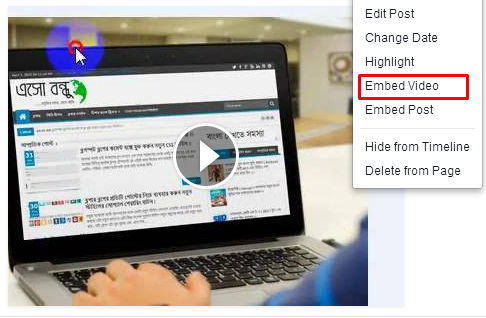
Go to the video which one you wanna share/embed. click on option and then click on "Embed Video".

facebook-embed

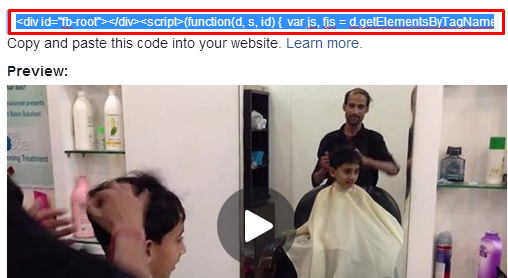
Here you will see a page like this. Copy the code from the Box. 

facebook-video-embed

2nd Step
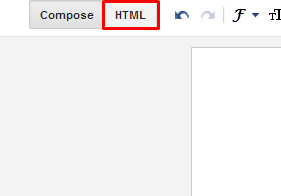
Go to your Blog and Click on New Post or edit the post where you wanna add this video. Click on HTML and paste the copying code where you wanna add the video. Click on Publish. See your post hopefully you will see your video on the post.

embed-facebook-video-blog-post-page

Thanks for reading. Comment If you have a problem...and Stay with us

How to Create a Free Blog site in 2 minute by Blogger

Create a Blog


Now a days everyone have a blog site. If you haven't, it's a matter of sorrow. But now I gonna make you happy. Cuz you gonna be a owner of a BLOG. So let's start....


What is Blogger?

Blogger is a online Blog making tool developed by Google. So, of course it's a big tool. It's also super easy. To make a blog you not need any idea about Html, php, javascript........bla bla.... or anything. Just follow me and be a owner of a blog site.


1st steps

To create a Blog you must need a gmail account. If you have one, then go to next steps. Or create a gmail account from here

2nd steps
After getting a gmail account you have to go to blogger.com . Log in with gmail account.

3rd steps
Here you will see like this image. Just click on New Blog


4th steps

Here you will see a window. Now you have to put your Blog Title and blog url in these box. Give your blog name such as Blog-Tech on first box. Give blog url such as blog-tech.blogspot.com. You must put blogspot.com on your url. And then select a Template as your wish. See on image.


5th steps

If everything ok, Then your blog will be created. So this is your blog. For checking go to your url. Now I will show you some basic thing of blogger. 


Some Needed Things
If you wanna post on your site just click on new post. Here you will see 2 box. 1st box for post title. And the 2nd box for post content. You can post by html code. Just click on Html. You can change your text size, bold text, underline text, change text colour, put image, put link, put video. After writing your post click on publish or save it. See on image


If you wanna change your blog style, Just click on Template on your dashboard. To upload Template click on Backup/Restore, and for changing from default template click customize and select template as you wish. 


So, This is your blog. For Updating your blog follow our more tutorial. You can check our videos. Like our facebook page. And subscribe our youtube channel. For any kind of Trick stay with us...

Thanks

How to Select Blogger Post Thumbnails as you wish/select one from many

Change Blogger Post Thumbnails as you wish


Some of you asked me that they wanna use post thumbnails which they want. But blogger has no system of this. So, is there no way???

No, I'm giving you a way. Actually this is not a pst with lot of code. This is only a Trick. Not need to use any code, anywhere. This is a short trick. 

If you need to use some image in your post, then which image will be selected as thumbnails? Blogger select it automatically. Generally blogger select the 1st image. But if you need to select another, then what will you do? 


Just insert this photo by uploading which one you wanna use as thumbnails. Insert the other photo by doing copy from google or anywhere. You can upload the photo on facebook. Then go to the photo. click right button of your mouse and select copy image. Then go to the post and paste the image. Blogger won't count the photo as a photo, therefor it will select the image as thumbnails which one uploaded.  This is the trick. 

So, Enjoy

DOWNLOAD PC GAMES

DOWNLOAD PC APPS