Showing posts with label PC TIPS. Show all posts

How to Download Movies, Games, Software, Songs for Free with Torrent

Hello, Everyone...

Welcome back again to Blog-tech.


Now, in this post I'm gonna show you how to download anything for free.


WARNING: This is Illegal, So Download with own risk. 
RECOMMENDATION: Use a VPN while downloading.

Search for free VPN

First, Download and Install Utorrent.

Then visit these sites for downloading

Movies


Games, Software, Movies, TV Shows


There are a lot of site for downloading. Just search on Google.

After going to any site you will get magnet link to download. Just click on these link. you will be automatically gone to utorrent. Select directory and hit Ok to download. 

Thanks Everyone.

How to Hide any File on your PC without any Software

Everyone have private files. So we have to Hide/Lock those file for keeping those private. But how to hide them easily?? It's a common question. There are many ways to keep them safe. Sometimes we have to use many kind of software. Or, sometimes we lock them by hard way. But, if we need them immediately, we have to go through this hard way. But now I will tell you the easiest way. It isn't require any software.


First off all create your folder and keep your files in the folder.

Then Select it.

Then Click on View like as Picture.


 Then Click on Hide selected items like as this picture.

After clicking that you won't see the folder. Don't worry. We have just Hidden the folder not deleted.


Now the Question is How to bring the folder back, It means how to unhide it. 

It's easy also. 


Just Click on View Tick on Hidden items. Come back. Now you will see the hidden folder.

 Select it and again click on View and then again click on Hide selected items such as picture.


That's it. If you like this post, Please share it. And if you got any problem let me know this. So put it on comment box.

Build The Best Gaming PC around $350 !! 2016!!


$350!! It's little chipper. But now we will build a Gaming PC under $350. This PC will give you a the best experience on this budget. I hope on this PC you could play High end game such as GTA V, Witcher 3, Call of Duty Black Ops 3, Far Cry 4 etc smoothly. And will get a good FPS rate sometimes better than PS4. So, Let,s Build our PC.

CPU
AMD Athlon X4 860K Kaveri Quad-Core 3.7 GHz
Price: $74


Motherboard

MSI Intel H81 LGA 1150 DDR3 USB 3.1 Micro ATX Motherboard (H81M-E34)

Price: $51


Ram

ADATA USA XPG V1.0 OC Series 8GB DDR3 1600MHZ PC3 12800 4GBx2, Black AX3U1600W4G9-DB

Price: $31

Hard Disk

WD Blue 1TB SATA 6 Gb/s 7200 RPM 64MB Cache 3.5 Inch Desktop Hard Drive (WD10EZEX)

Price: $50


Graphics Card

EVGA GeForce GTX 750Ti SC 2GB GDDR5 Graphics Card

Price: $120


Case

Xion Performance mATX USB 3.0 Tower Case Black/Blue XON-310_BK

Price: $26
Total Cost: $(74+51+31+50+120+26) = $352 

So, Here is our PC parts. I hope it will be the best gaming PC on this budget. You could play Game 1080p resolution on this PC and hopefully it will be played smoothly. Enjoy...

How to Use a Password On Pendrive without any Software

Welcome to Blog-Tech. Today I'm gonna show you How to use a password on Pendrive. You don't need any software to do this. Just follow may Instruction. 


Sometime, we use our pendrive to keep our private data. But if we lost the pen drive and it have no password, then our private will be unsecured. So, It's better to use a password on your pen drive. Let's see how to do this...

1st step
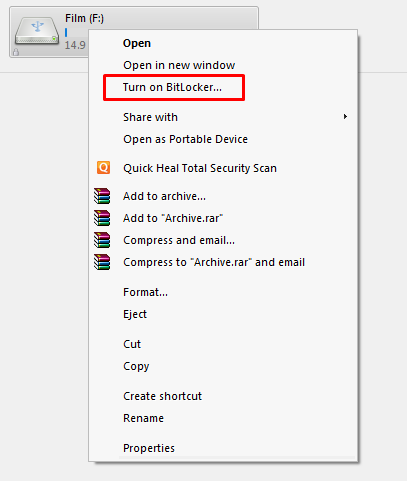
Plug in your pendrive on your PC. Go to Computer Drive and select pen drive and click on mouse right button. Then click on "Turn on BitLocker" like this image


2nd step
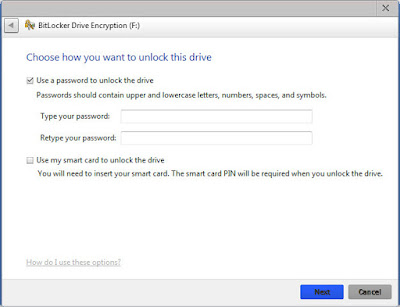
Then you will see a page like this image. Select "Use a password to unlock this drive" and give your password twice on this tow box. After giving password click on Next at the bottom of the page.

কোন রকম সফটওয়্যার ছাড়াই পেন্ড্রাইভে পাসওয়ার্ড দিন ।

3rd step
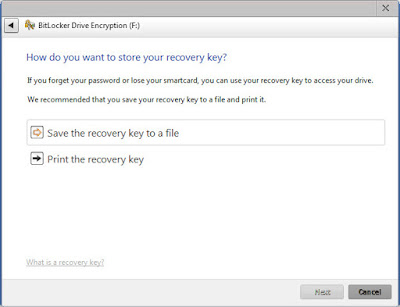
Here your Recovery Option. It will help you to unlock your pen drive when you will loss your password. Click on "Save the recovery key to a file" and save the file. Then click on Next.


কোন রকম সফটওয়্যার ছাড়াই পেন্ড্রাইভে পাসওয়ার্ড দিন ।

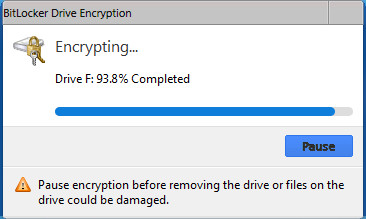
It will take some time to finish. Wait until It has done to 100%.


After completing 100% unplug pen drive and again plug it. Now you will see a password box to play the drive...

Thanks for reading me. Stay with us..

DOWNLOAD PC GAMES

DOWNLOAD PC APPS